New Now on Google Play · Made for India

GST billing that works offline.
Invoices in seconds.

Hisab is a free GST invoice maker for Indian shops, traders and freelancers. Create tax invoices with automatic CGST, SGST & IGST, share PDF bills on WhatsApp, and track payments, stock and expenses — all on your phone, no sign-up, no subscription.

  • 100% offline
  • No account needed
  • No ads, no tracking
  • Free forever
  • 100%Offline · nothing uploaded
  • ₹0Subscription, forever
  • 10+GST invoice templates
  • 0Ads or trackers
  • Retail shops
  • Traders & wholesalers
  • Service providers
  • Freelancers
  • Small manufacturers
Everything you need

A complete GST billing system in your pocket

From the first quotation to the final payment, Hisab keeps your books straight without a laptop, an accountant or an internet connection.

GST invoices & quotations, done right

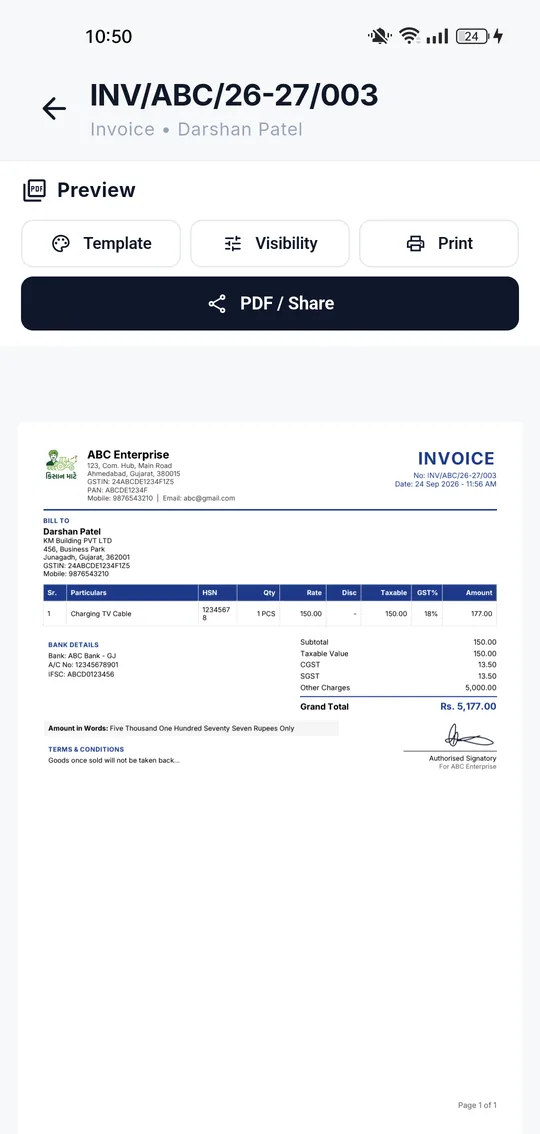
Pick a customer, add items, done. Hisab applies CGST + SGST or IGST automatically from the place of supply, prints HSN/SAC codes, amount in words, bank details and your signature. Convert any quotation to an invoice in one tap.

New invoice editor in Hisab with customer picker, items and adjustments

Share PDF on WhatsApp

Every invoice becomes a crisp A4 PDF. Send it on WhatsApp or email, print it, or save it — straight from the preview.

10+ invoice templates

Modern Classic, Minimalist Clean, Standard GST Grid and more — each with your logo and a custom theme colour.

Payments & outstanding

Record full or partial payments against any invoice. See paid, partially paid and overdue at a glance, and what each customer still owes.

Catalog with live stock

Products and services with HSN/SAC, GST slab and SKU. Stock moves automatically: invoices deduct, purchases add.

Purchases with bill photos

Log supplier purchases, snap the bill, and keep payables separate from receivables. Sellers get their own ledger.

Profit, loss & GST reports

Revenue, cost of purchases, expenses and net margin — excluding GST, the way an accountant reads it. Plus a GST summary for filing.

Encrypted backup & restore

Export your whole business to one file, optionally locked with a password. Restore it on a new phone in a minute.

Zero internet required

No sign-up, no OTP, no sync. Open the app and bill — in a basement shop, on a site visit, or on a train.

How it works

Your first GST invoice in under two minutes

No training, no setup wizard that never ends. Three steps and you're billing.

  1. 1

    Add your business

    Name, state and (optionally) GSTIN. Add a logo, signature and bank details so they appear on every invoice.

  2. 2

    Pick a customer & items

    Choose from your clients and catalog, or create them inline. Taxes, totals and amount in words fill themselves in.

  3. 3

    Issue, share, get paid

    Preview the PDF, share it on WhatsApp, then record the payment when it lands. Outstanding updates instantly.

Real screens

Designed to be fast with one thumb

A quiet, dense layout that puts the numbers first. These are actual screenshots from the app, not mock-ups.

Invoice templates

Bills that look like your business, not a spreadsheet

Choose a layout, pick a theme colour, decide which fields show. Your logo, GSTIN, bank details, signature and terms are placed for you — GST Rule 46 fields included.

  • Standard GST Grid
  • Modern Classic
  • Minimalist Clean
  • Custom theme colour
  • Logo & digital signature
  • HSN/SAC summary & amount in words
Private by design

Your books never leave your phone

Most billing apps are cloud services that happen to have an app. Hisab is the opposite: the database lives on your device, and we built it so there is nothing of yours for us to hold.

Stored on-device

Invoices, customers, products, payments and expenses sit in a local database. No cloud copy, no sync.

No analytics, no ads

No tracking SDKs, no advertising identifiers, no crash reporters phoning home. Read the policy — it's short.

No account, no OTP

Install and start billing. There is no login, no password to forget, and nothing to be locked out of.

You hold the backup

Export an encrypted backup file whenever you like and keep it wherever you trust. Only you can open it.

FAQ

Questions shop owners ask us

Is Hisab free to use?
Yes. Hisab is free to download and use. There is no subscription, no per-invoice charge and no advertising.
Does Hisab work without internet?
Yes. Every feature — creating invoices, generating PDFs, recording payments, reports and backups — works completely offline. Internet is only needed to install the app from Google Play.
Where is my business data stored?
On your phone, in the app's own database. Invoices, customers, products, payments and expenses are never uploaded to any server. Only a short business registration record (name and address) is sent when you save your business profile — see the Privacy Policy.
Does Hisab calculate CGST, SGST and IGST automatically?
Yes. Hisab applies CGST + SGST for intra-state sales and IGST for inter-state sales based on your state and the customer's state code, with per-item tax rates and HSN/SAC codes.
Can I use Hisab if my business is not GST registered?
Yes. GSTIN is optional. You can issue simple bills without GST and add your GSTIN later when you register.
How do I back up my data?
Settings → Export backup saves everything to a single file you can protect with a password. Restore it on a new phone with Import backup. Because there is no cloud copy, exporting regularly is recommended.
Which devices does Hisab support?
Hisab is available for Android phones and tablets on Google Play.

Start billing in the next two minutes

Free on Google Play. No sign-up. Your first GST invoice is one tap away.